

The Messages app is one of the most-used apps on iPhone, and Apple has kept adding features to it. Apple’s changes over the past year include new customization and group chat tools with iOS 26, followed by bug fixes, suggestions and smarter replies in iOS 27 this year.
New features added with iOS 26
iOS 26 brought a set of Messages features that focus on customization, group chats, planning and spam. Users can now set custom backgrounds for individual conversations and group chats, which gives each thread its own look.
Group chats received several upgrades, including typing indicators. Group chats also support Apple Cash, which makes it easier to split a bill with friends.
Polls are another addition. People can create polls in the Messages app to settle questions such as where to eat dinner or what time to meet up. On devices that support Apple Intelligence, the Messages app can also suggest and create polls automatically.
Spam has become a growing problem for iPhone users, and iOS 26 adds filtering options to help. From the upper-right corner of the Messages app, users can filter conversations by Unknown Senders, Transactions, Promotions and Spam. The filters are meant to keep the main message list uncluttered.
iOS 27 focuses on bug fixes and performance
iOS 27 adds more to the Messages app, with a focus on bug fixes and performance improvements. Apple has fixed three of the most frustrating Messages problems. Messages that fail to send will retry automatically, and the app now supports continuous sending of photos, videos and messages. Syncing across devices has also improved.
These changes address issues that many people run into on a daily basis. A message that fails to send no longer needs to be resent by hand, and the improved syncing helps keep conversations consistent across an iPhone and other Apple devices.

One-tap suggestions and smarter Smart Reply
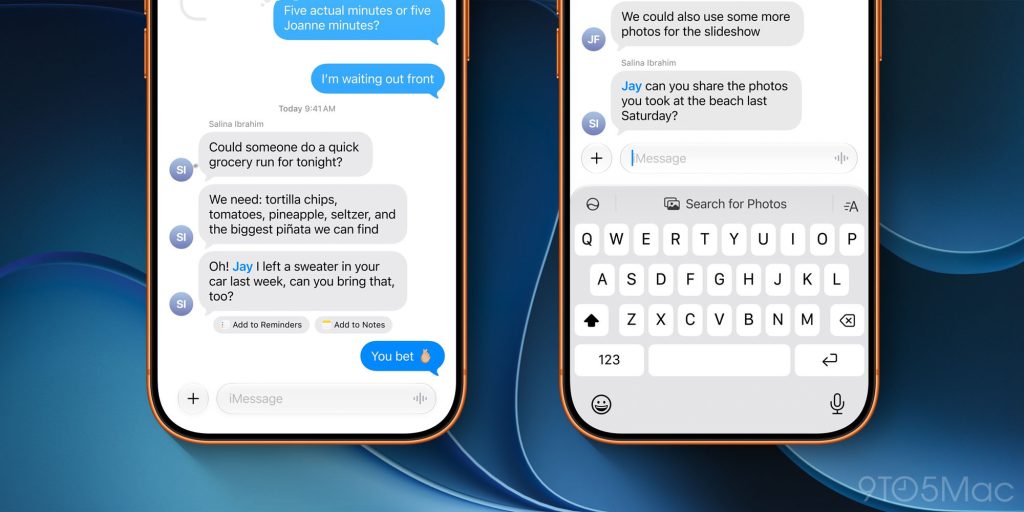
iOS 27 also introduces one-tap suggestions based on the context of a conversation. For example, the Messages app can offer to create a reminder or a note from something a person has written. In a sample conversation, a message asking for a sweater left in a car prompts buttons to add a reminder or a note.
Smart Reply has also been updated. According to Apple’s feature set, the Messages app now offers more intelligent reply suggestions that are based on a user’s personalized writing style. The replies are designed to sound more like the person typing them.
Better RCS support and encryption for Android chats
Apple has continued to improve its support for RCS, the Rich Communication Services standard that succeeds traditional SMS. RCS allows richer messaging between iPhone and Android users than standard text messages, including better photo and video sharing and read receipts. Apple has steadily improved its RCS implementation to make cross-platform conversations with Android friends and family work better.
The most notable change this year is end-to-end encryption for RCS messages. End-to-end encryption means only the people in a conversation can read the messages, rather than the service carrying them. Apple added support for the feature this year, which strengthens privacy for messages sent between iPhone and Android devices.
What the updates mean for iPhone users
Taken together, the changes make the Messages app more reliable and more useful for everyday tasks. Automatic retries and continuous sending address common frustrations, while suggestions and Smart Reply aim to reduce the effort of turning conversations into reminders, notes and replies. Users who rely on group chats may find the polls, Apple Cash support and custom backgrounds the most immediately useful.
The updates are available through iOS 26 and iOS 27 on supported iPhones. Features tied to Apple Intelligence, such as automatic poll creation, depend on compatible devices. Apple has not said which additional features may arrive in later updates.