

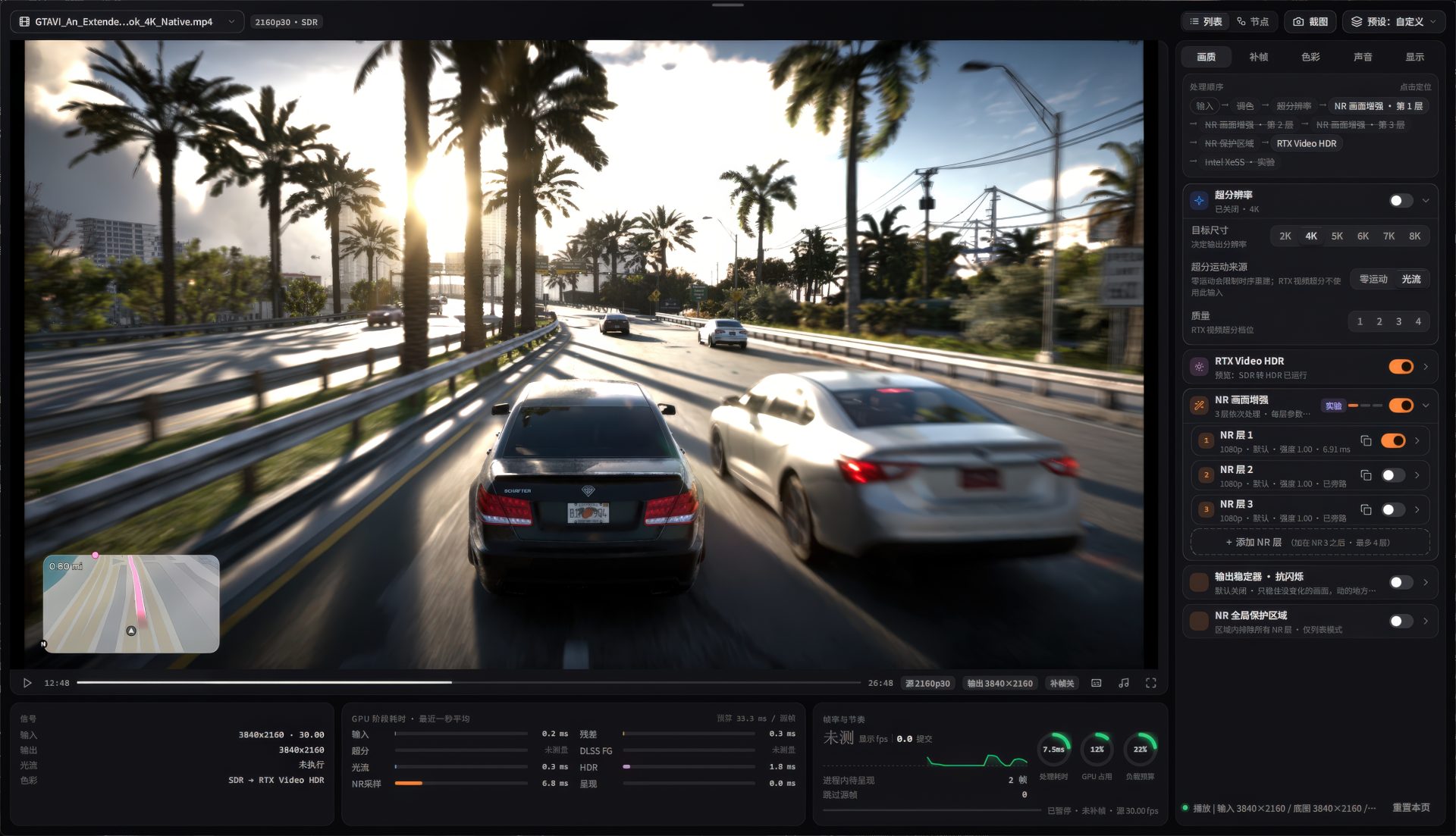
PC players are going to unusual lengths to play GTA VI with extra features. Two free tools now promise DLSS 5 enhancements on streams of the PS5 version, but the game itself still renders at 30 FPS on the console.
How Veyra adds DLSS 5 to GTA VI streams
Veyra, or Veyra-NRVideo by its full name, is a free Windows 11 application licensed under GPL-3.0. It applies GPU enhancements to a video source in real time. Its GitHub page pitches the project with the line “Bring PS5 GTA6 to 120FPS with DLSS 5.” The project has 4.9k stars and 333 forks, and version 2.2.0 was recently released.
The tool accepts several inputs. Users can feed it a capture card, a PS5 connected through Remote Play, a PC stream sent via Sunshine, or a single window on the desktop. An Xbox source is also supported, although the project labels that option unofficial and experimental.
Veyra renders everything through DirectX 12 and ships separate builds for NVIDIA and AMD graphics cards. Its feature set includes three selectable upscalers: NVIDIA DLSS, Intel XeSS and AMD FSR. It also offers NVIDIA DLAA, neural denoising, HDR handling and frame generation. Users arrange these effects either as an ordered list or as a node-based chain.
NeuralScreen and a GameGPU test on RTX 5090 hardware
Veyra is not the only option. NeuralScreen applies DLSS 5 neural rendering to the entire Windows desktop in real time. Its developers claim support for NVIDIA GeForce RTX 30, 40 and 50 Series graphics cards.
GameGPU ran GTA VI on a PS5 Pro and captured the output through an AVerMedia Live Gamer ULTRA 2.1 GC553G2 capture device. The capture fed a system with an NVIDIA RTX 5090 and an AMD Ryzen 7 9800X3D. The test applied DLSS 5’s Natural profile along with 6X frame generation through NeuralScreen v2.6.4.
At 4K, the setup produced a stable 262 to 280 FPS, with peaks of 286 FPS. The RTX 5090 ran at 62 to 75 percent utilization, drew between 305W and 368W, and used around 5.3 GB of video memory.
Why the frame counter does not mean faster gameplay
The high frame rate does not change how fast GTA VI runs. The console still renders the game at 30 FPS, and every step after that is interpolation and post-processing applied to a video signal. The 280 FPS figure reflects smoother motion on the display, not better responsiveness.
Input feels worse than playing on the console itself. The extra processing adds input latency, and that delay is the main trade-off for players who use these tools.
Capture cards, Remote Play and the limits of DLSS 5
A capture card should perform better than PS5 Remote Play. It takes the HDMI signal directly, while Remote Play has to encode, transmit and decode the video across a network. Even so, the method remains a workaround, and its benefits may be outweighed by its drawbacks.
DLSS 5 normally works best when it receives color and motion vectors from the game engine. In these setups it receives neither, so it processes GTA VI the same way it would process any ordinary video. That is why the DLSS 5 effect cannot match the native integration seen in regular PC games.
What PC players can expect from an official release
Veyra and NeuralScreen are unofficial tools, and Rockstar has not announced a PC version of GTA VI. GamesBeat sources have suggested that Rockstar might target a first-quarter 2027 launch for PC. That timing has not been confirmed, and players who want the game with native frame rates and full DLSS support may need to wait for it.